There are six seven luxuries in life:
– time
– health
– a quiet mind
– slow mornings
– ability to travel
– a house full of love
– to be close to the sea and to the mountains, as often as possible
There are six seven luxuries in life:
– time
– health
– a quiet mind
– slow mornings
– ability to travel
– a house full of love
– to be close to the sea and to the mountains, as often as possible
“Go into the arts. I’m not kidding. The arts are not a way to make a living. They are a very human way of making life more bearable. Practicing an art, no matter how well or badly, is a way to make your soul grow, for heaven’s sake. Sing in the shower. Dance to the radio. Tell stories. Write a poem to a friend, even a lousy poem. Do it as well as you possible can. You will get an enormous reward. You will have created something.”
— Kurt Vonnegut
Source: https://www.goodreads.com/quotes/17931-if-you-want-to-really-hurt-you-parents-and-you
Note: The full quote starts with “If you want to really hurt you parents, and you don’t have the nerve to be gay, the least you can do is go into the arts…” I don’t think this is the most relevant part of the quote though, so I omitted it. :)
The following quote deeply resonated with me for some reason:
Don’t save good things for a mythical future “special occasion” that may never come. Don’t leave pretty journals blank for fear of ruining them with your words, sketches, and drawings. Don’t leave the nice wine on the rack to get corked.
Use the good things to make today the special occasion. When they come to clear your house when you’re dead, let them find full journals and empty bottles. Not the other way around.
(The bottles can be from fancy olive oil or something, if booze isn’t your thing. ;))”
— via (and with some little tweaks by me): @beecycling
“Your children don’t belong to you. You’re on borrowed time with them. Your mission, should you choose to accept it, is to build a better human being; not to build a mini version of you and all your deflated hopes and dreams. Help them become the best them, not the best you.”
~Source: unknown (although I’ve seen this quote also appear in TinyBuddha, Instagram, and a few other places)
Actually, this quote appears to be a shorter paraphrase of one of Khalil Djubran‘s poems, “On Children”. (Check it out.)
There’s a lot of truth in these words. 💖
If you often work with a laptop on the go, you may enjoy the laptop to be a bit cooler when it is in your lap.
One simple way to achieve this is by limiting the maximum frequency of the CPU, and for this to happen, you do not have to go into the BIOS or to search for some advanced settings, it’s very easy. And there’s no need to reboot the machine — you can change the setting at any time!
Let’s face it, ads — pop-ups, pop-unders, blinking GIFs, flashing, with loud sound, stealing our network bandwidth, etc. — are super-annoying!
⏩ Note: You may skip to the end of my short article if you just want to see what you can try at home and what is likely to work (hopefully).
Ad blockers for browsers (most of them, at least) still work as of today, although some of them may occasionally display “glitches” when companies pushing ads into all of our screens try to overcome the ad protections we use. Ad Block Plus for Firefox, for example, as well as Ghostery for Firefox, worked almost flawlessly until recently, when YouTube started implementing even heavier counter-ad-block protections and started refusing to display the YouTube videos unless you disable your ad-blocker browser extensions! This was the moment when I had to try uBlock Origin for Firefox add-on and luckily it worked, no ads in YouTube — for now…
But ad block extensions for browsers have one major drawback — they can’t filter ads in mobile apps. Basically, your anti-ad protection is “locked” to your browser where the specific ad extension is installed and runs. Once you are outside of the browser, you have no protection anymore.
So I started looking for a better solution. I tried a few things and after a couple of days of research and trying various options, seems that for our local home network, a pretty good option is to set a custom DNS server that can filter popular advertising servers. One such server is AdGuard’s DNS (dns.adguard.com) which is considered generally to be safe and pretty reliable.
“AdGuard DNS (dns.adguard.com) is generally considered to be safe for Android devices. AdGuard DNS is a free service that provides an additional layer of security by blocking ads, tracking, and malicious websites at the DNS level. By using AdGuard DNS, you can potentially reduce the risk of malware infections, phishing attacks, and other security threats while browsing the internet. […]”
— “Is DNS AdGuard.com safe for Android?“
I first saw a mention of dns.adguard.com in the XDA Developers article “How to block ads on Android, with root and without root“, tested it, and it worked on our Android phones. Then for some reason, the next day the Android phones complained that they cannot access the DNS server anymore — no idea, why.
The DNS server can be added normally to your Android phone if you are with Android 9.0 or later. Open Settings → PrivateDNS → enter a custom DNS hostname → Save. Initially this worked for a day (we haven’t seen a single annoying ad on our phones during this time!) but then something happened and this DNS server stopped providing the DNS service.
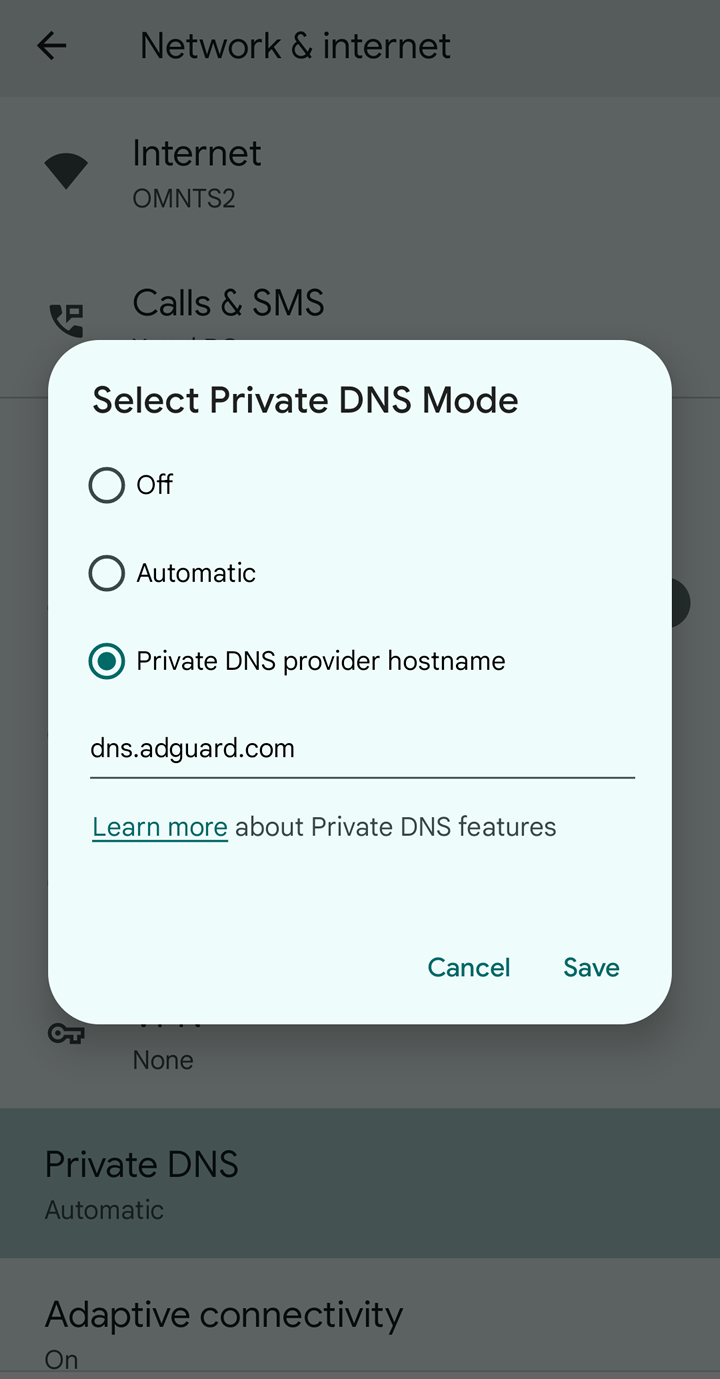
This setting worked for one day on our Android phones, then stopped.
After that, I tried a few other options, and finally — what worked — was to add the AdGuard DNS to our home router’s settings. The same DNS server which stopped working on Android, was working when we tried to set it as a “Static DNS” in the router’s settings web page.
I will test this setup during the next few days and if needed, I will update my blog post. But for now, it works — we see no ads on any of the devices (computers, laptops, phones) that are connected to our home network.
Steps:
1. Open the home router’s configuration page IP address. Quite often it is 192.168.1.1 — if it is not, search online for your router maker/model, or ask your ISP provider (if the router was configured by their IT people).
2. Somewhere in Connectivity → Local Network → try adding the IP address of the dns.adguard.com DNS server — currently it is 94.140.15.15. Enter the IP address, press Apply, and wait for the router to accept the setting. (Note: Here you can enter any DNS server IP address that you know will work and will filter ads.)
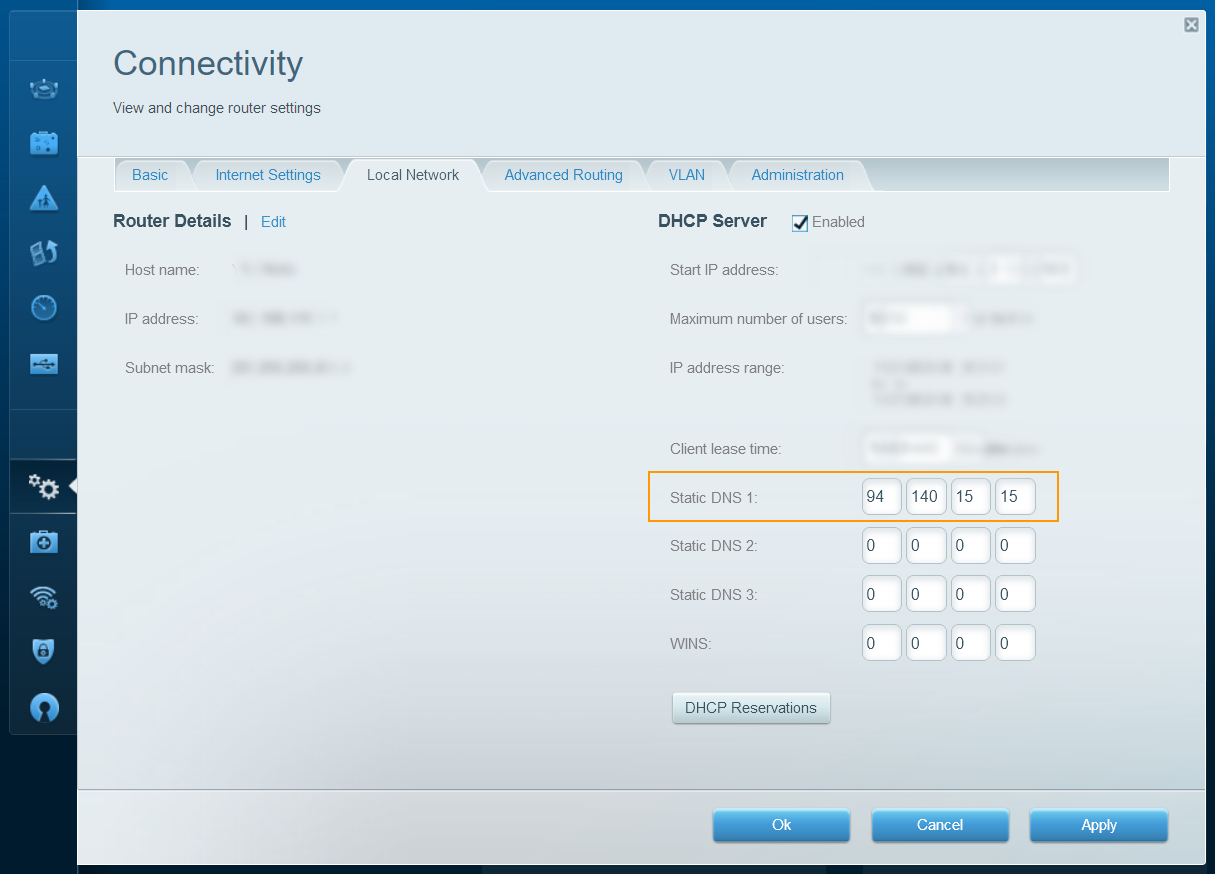
Set a custom static DNS in your router’s config page.
Note: To make things more bulletproof, you can also add a “Static DNS 2” on this page. Thus, if for some reason the first DNS server is not working at any given moment, the second DNS will act as a backup DNS. As a backup second DNS, I can suggest using the Cloudflare DNS server — one.one.one.one (1.1.1.1).
3. To test if everything works, try opening a few websites on the computer or laptop — if they open normally, then great, this is a good start! After that, in a browser (or a browser profile) which does not have an ad-blocking extension installed, try accessing a website which you know for sure is displaying ads and see if they show up — if you see no ads (or you do see some ads, but in a much lesser quantity than usual), then the ad filtering is working as well! After that, on your phone (again, connected to your home network), try accessing a mobile app or a game that usually shows ads and if you see no ads there either — perfect!
Take my hand, one two three
We will jump together through
The skylight on the sea
Become one with me
Found a gap in the folds
Between the worlds
Where I will wait for you, love
With our bruised love
Love that’s weathered has a shape
Beyond a new love
Fucking love
Before they drop the bomb make
Sure we get enough
Fucking love
Fucking and love
Before they drop the bomb make sure
We get enough
You blow my mind
When we come together
A rent in time
Takes two of us to breathe
You blow my mind
Into the whatever
How high is too high
A singularity
Let me know if you got free
Did your star map lead you home
The skylight on the sea
Trust outweighs beliefs
We’re just guests within these skins
Of blood and bone
Ride inside the star ship
Never twice the same trip
Hold me in a tight grip
Healing for the lovesick
Ride inside the star ship
Never twice the same trip
Hold me in a tight grip
Healing for the lovesick
Ride inside the star ship
Never twice the same trip
Don’t wanna be alone
Written on my headstone
Ride inside the star ship
Never twice the same trip
Don’t wanna be alone
Written on my headstone
You blow my mind
When we come together
A rent in time
Takes two of us to breathe
You blow my mind
Into the whatever
How high is too high
A singularity
(via: https://genius.com/James-leviathan-lyrics & Ani)
James — Leviathan
The short answer to the question, “Is COPYTRACK a scam — or a plain fraud?” is yes — because…
…You need to read on about what happened to Ani in February this year when an email from (allegedly) COPYTRACK lawyers landed in her inbox. The entire email conversation with COPYTRACK is then described in great detail and you will learn a great deal about COPYTRACK’s shady practices.
To sum things up, it turns out that Ani has used in one of her blog posts an image representing a puzzle purse Valentine card from c. 1790 (!) that since many years is part of The Postal Museum’s collection (!) in London. A photograph of the puzzle card was taken by a museum photographer in 2011. A smaller copy of the card was used at some point by Ani in her blog — and after an inquiry addressed to the Postal Museum, it was then used even with an official permission.
Yet COPYTRACK tried to extort some money from Ani by using “legal threats” and pretending that they own the copyright for this puzzle card! Once COPYTRACK have learned that Ani is in touch with the Postal Museum’s Senior Archivist and the archivist assured Ani that the card is in the museum collection for a long time — and that she can use the card on her blog — COPYTRACK suddenly cut all communication and disappeared.
So be careful. If you receive an email from COPYTRACK and their “lawyers”, make a thorough investigation first — and do not send them them any money before making sure that their claims are valid!